
Type onboarder to open the Hermes-powered chat interface for the current repository, or onboarder chat ~/work/some-repo to open another local checkout. An amber welcome screen shows the actual configured model, repository, permissions, six workflow skills, and available registered tools. The composer has a session status bar with recorded token usage, elapsed run time, and live tool activity. It keeps terminal scrollback and loads the browsing engine only when requested.
Navigate without memorizing commands#
| Shortcut or command | What it does |
|---|---|
| Ctrl-P | Search the command palette by name or topic. Enter inserts the command; a second Enter runs it. Escape returns to your draft. |
Ctrl-O or /open [query] | Search indexed code files, then choose Read source, Inspect, Trace connections, Graph, Change impact, or Explain locally. These actions work offline. |
Ctrl-R or /resume | Search saved conversations for the current repository. Your current permissions are retained. /resume <ID> still works. |
| PgUp / PgDn | Read earlier output while keeping your input intact. New output is counted without moving your reading position. |
| Ctrl-End | Jump back to the latest output. |
/help or /help <command> | Open a guide grouped by task, or see usage for one command. /help all prints the complete reference. |
Menus keep unfinished input. If you choose a palette command while drafting a question, submitting the command restores the question and its cursor position. File navigation follows the active implementation workspace. Indexing happens when you browse; switching repositories hides completions from the previous repository until the new one is indexed.
Chat uses separate You, Onboarder, and Result blocks with amber borders that resize with your terminal. Tool activity stays muted; completed, cancelled, and failed replies close with a clear status and elapsed time. A shaded status bar separates the conversation from the Message input, with the model, current activity, and permissions visible when space allows. Code indentation and pasted text are preserved.
onboarder chat
onboarder chat ~/work/some-repo --mode review
onboarder chat https://github.com/owner/repo
onboarder chat --resume <conversation-id>
Inside the chat:
codebase ask › /model configure
codebase ask › /repo https://github.com/owner/repo
codebase ask › Explain how authentication works
codebase ask › Where are those permissions checked?
codebase ask › /review 42 Focus on correctness and security
codebase review › /triage 12
codebase triage › /permissions checks on
codebase triage › /implement Fix the bug described in issue 12
codebase implement › /diff
codebase implement › Add a regression test for that fix
codebase implement › /history| Commands | Purpose |
|---|---|
/ask, /review, /triage, /implement, /pr, /github | Start a workflow; following messages continue it |
/mode, /model, /permissions, /limits | Control the workflow, provider, allowed actions, timeout, and turn budget |
/map, /tree, /find, /show, /diff, /health, /rescan | Browse and analyze offline; inspect the active implementation workspace |
/tour, /explain, /deps, /inspect, /graph, /blast, /symbols | Follow the reading order, inspect modules, and trace dependencies |
/hubs, /layers, /patterns, /stats, /security, /stack, /entry, /externals, /coupling, /clusters, /risks | Explore repository structure, health, and risks |
/log, /hotspots, /blame, /diagram, /layers-diagram, /atlas, /docs, /workflows, /sbom | Inspect Git history, diagrams, documentation, CI, and licenses |
/engines, /deep, /web, /about | Discover and run optional analyzers, start the web interface, and inspect repository details |
/new, /history, /resume, /repo, /status | Manage saved conversations, repository context, and workspaces |
/clone <GitHub URL>, /pull | Clone a GitHub repository and refresh a clean saved checkout |
/paste, /send, /discard | Compose or discard multiline prompts and code |
/setup, /doctor, /help, /clear, /cancel, /exit | Set up Hermes, check readiness, and control the terminal session |
/tools, /skills, /runs, /run, /export | Inspect actual capabilities, saved runs, and export this chat as Markdown |
Typing / immediately opens a searchable command menu with descriptions. Keep typing to filter, use ↑/↓ to choose, and press Tab or Enter to fill the command without starting a task. A fully typed command executes on Enter. Esc dismisses the menu and restores normal history navigation. Tab also completes settings and indexed file paths. Alt-Enter adds a newline; bracketed paste keeps multiline code together and waits for Enter before sending. Ctrl-A/E move to the start/end, Ctrl-U clears the draft, and Ctrl-C cancels an active task. Ctrl-D cancels, saves, and exits when the draft is empty.
Chat opens in a full-screen terminal interface with the composer pinned to the bottom. The welcome, conversation and menus automatically reflow when the terminal window changes size. Page Up / Page Down scroll the conversation without editing your draft; new output preserves your reading position until you return to the latest messages. Narrow or short windows use compact layouts, and the original Onboarder code-compass logo appears in full or compact terminal art. Its reusable vector image is public/assets/onboarder-mark.svg.

The screen paints only changed rows and batches streamed output. Drafts survive resizes and model-wizard handoffs, and leaving chat restores the original shell screen. The in-memory viewport retains up to 4,000 logical lines or 2 MiB; conversation storage and /export remain available separately. Follow-ups reuse the saved Hermes session and its isolated implementation workspace. Changing the workflow, PR/issue target, model, or permissions starts a new session. /clear clears the screen while keeping context; /new resets the conversation. Checks and GitHub writes default to off. /deep runs the same external analyzers as the web UI and requires checks permission. /pr prepares changes locally unless GitHub writes are enabled; publishing must also be requested in the task. /export saves a private Markdown transcript under the agent home's exports folder.
/model opens a Hermes-style provider/model picker below the input. Type to filter, use ↑/↓ to select, and press Enter to choose. Available providers and models come from the installed Hermes catalog; selection uses Hermes' own credential resolution and saves the model to the dedicated Onboarder profile. Escape keeps your current model and conversation. Choose Configure provider / authentication, or run /model configure, for the full official Hermes configuration, including custom endpoints and provider login. Older Hermes installations can use this full wizard when the quick picker is unavailable. No model names or provider credentials are hardcoded into the picker.
At startup, if Hermes is missing, chat shows Hermes is not installed with a verified official installer pinned to a reviewed upstream commit. Press Enter to download and verify it before installation, then configure a provider and model, or choose Continue offline. /model and /model configure offer the same install prompt when Hermes is missing. With Hermes installed, an unconfigured profile offers Choose a provider and model or Continue offline; configured profiles start directly in chat. Offline commands work without Hermes. Conversation summaries are stored privately in ~/.config/onboarder/agent/chats, alongside agent runs, and known environment credentials are redacted. /resume requires a conversation for the current repository and preserves your current permission choices. onboarder chat --resume takes a conversation ID; onboarder agent … --resume takes an agent run ID.
To ask about a GitHub repository, launch onboarder chat https://github.com/owner/repo, use /repo <URL> or /clone <URL>, or simply paste the URL into chat. You can also paste <URL> Explain this repository to clone and ask in one message. HTTPS and GitHub SSH URLs work; private repositories use your existing Git credentials. Cloning shows progress and can be cancelled with Ctrl-C.
Chat checkouts are saved under ~/.config/onboarder/agent/repositories and remain after exit, so conversations and isolated implementation workspaces can resume. Reopening the same URL reuses its checkout. /pull fetches current changes with a fast-forward-only pull and refuses local changes; use /new first if an implementation workspace is active. A successful pull resets AI context so the next question reads the updated source. To resume later, reopen the same URL and use /history, then /resume <conversation-id>.
Current terminal design#
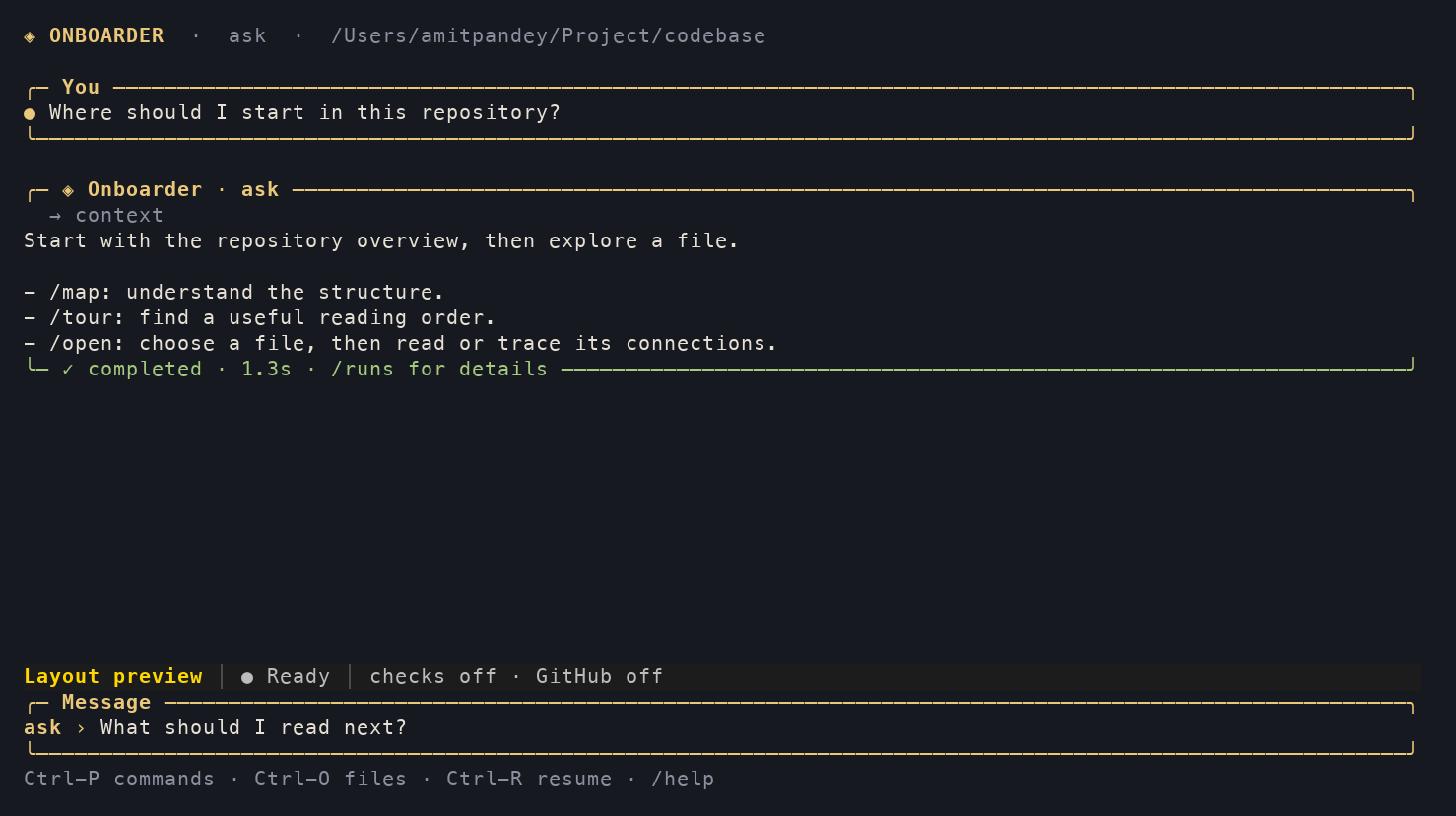
Captured from a real terminal with a controlled sample response and a clearly labeled Layout preview model. Offline file navigation does not require an AI provider.