v1.2.0 A refreshed workspace. An Apple Silicon Mac preview.What’s new ↗
Public betaBy Intellimatrix ↗

Know yourcodebase.Find your way.

There’s a way into every repository. Find the entry points, follow the dependencies, and understand the change — on your own machine.

Apple Silicon · macOS 14+ · Development preview, not notarized

Prefer the terminal?

npm install -g [email protected]

Terminal: Node.js 20+ · Open source / MIT · Local analysis

An original natural-history engraving of an owl with its wings raised
STUDY 02 / THE OBSERVER
Follow the connections

LOCAL EXPLORATION
YOUR REPOSITORY. YOUR PERSPECTIVE.

THE PRODUCT / THREE STARTING POINTS

Open it.
Find your bearings.

One repository, three ways in. Take a closer look at the actual workspace, architecture explorer, and terminal.

01 / OPEN

Start with the
repository in front of you.

Open a local path, paste a Git URL, or choose a browser folder. Your starting point is the code you’re working with.

  • Local paths and Git repositories
  • A workspace on your own machine
  • No account for offline exploration
Loading a repository ↗
02 / UNDERSTAND

See the connections.
Find where to start.

A folder tree shows what exists. Follow imports and dependents to understand how files fit together before making a change.

  • Architecture maps and entry points
  • Imports, dependents, and guided tours
  • Local review and change context
Inside the web workspace ↗
03 / KEEP WORKING

Stay close
to the code.

Use the terminal explorer offline, or configure Hermes for optional repository conversations. Browse files, find commands, and resume your work.

  • File browsing with Ctrl-O
  • Command search with Ctrl-P
  • Optional AI with your own provider
The terminal workflow ↗


ONBOARDER / IN PRACTICE
EXPLORE / WEB WORKSPACE
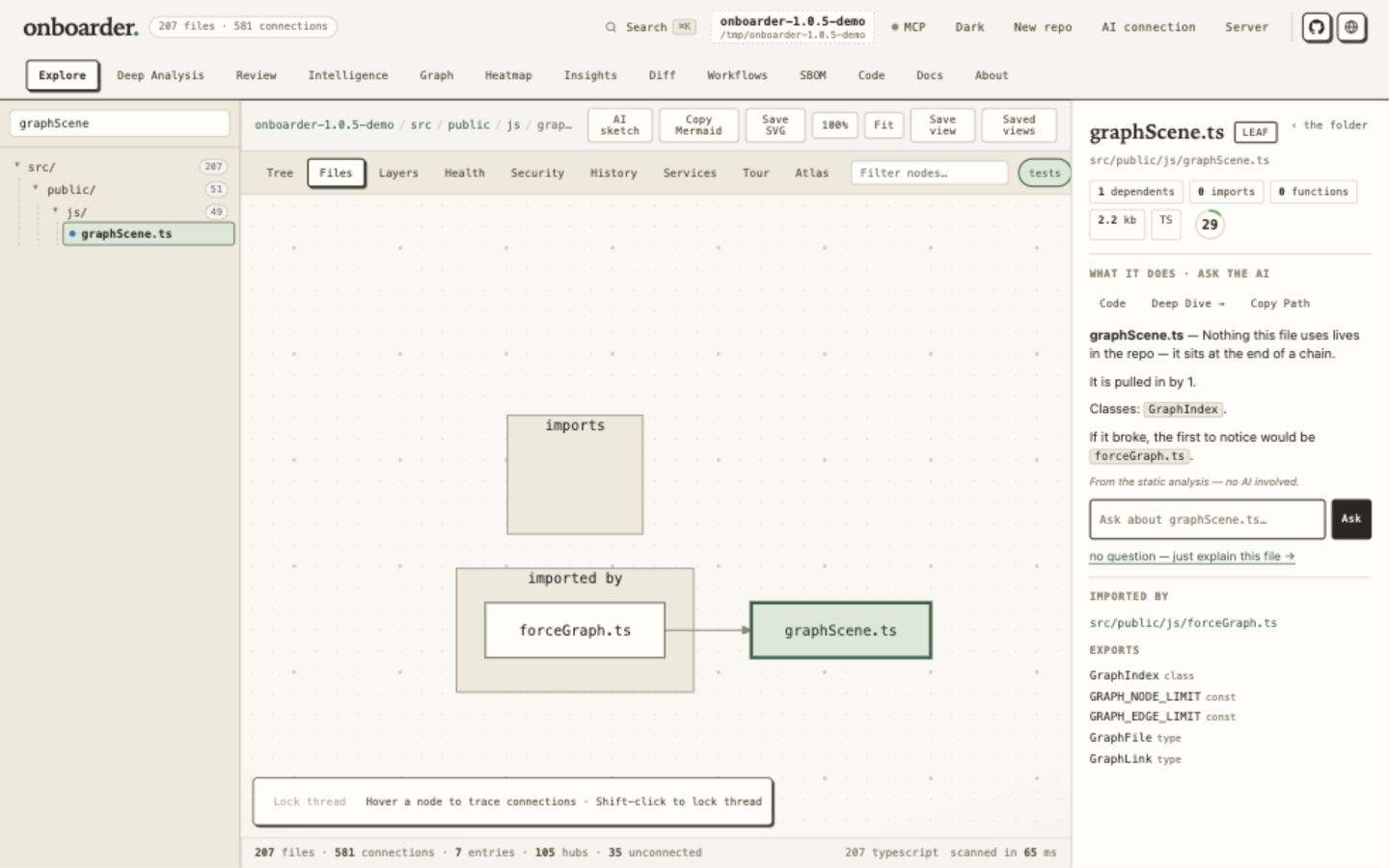
Real Onboarder explorer showing directories and imports

Architecture explorer

Move through directories, inspect modules, and follow the imports that hold a repository together.

Real 1.0.5 web screenshots, preserved with their original provenance and matched to your theme. The 1.0.4 terminal preview uses a controlled sample reply. Explore the current guides below for review workflows and the refreshed workspace.

02 / TRY A SMALL EXAMPLE

Follow a file through the map.

Choose one of six example files to see its imports and dependents.

example / src
ARCHITECTURE / DEPENDENCIES Selected module
CLICK A MODULE TO EXPLORE

Interactive example, not a repository scanner. Install Onboarder to explore your own code locally.

03 / WATCH IT IN USE

A 40-second walkthrough.

From loading a repository to reviewing changes.
Recorded product screens. Instrumental soundtrack, no voice-over.

ONBOARDER / THE SHOWCASE FILM40 SECONDS · 1080P

Architecture maps, local reviews, and terminal workflows.
Original ambient music. No voice-over.

View on GitHub
Read the video description

0:00–0:07: The Onboarder compass introduces finding your way through code. 0:07–0:14: Load local folders, Git URLs, or browser folders. 0:14–0:21: Explore architecture and imports. 0:21–0:28: View an example local review report. 0:28–0:35: Explore a real offline terminal session with repository tools and six workflows. 0:35–0:40: Installation command and creator credit. The music is instrumental; review counts are examples from a recorded scan.

REVIEW TO VERIFIED CHANGE

Understand the finding.
Approve the next step.

Keep the decision in your hands. Optional AI proposes changes; exact approval and separately authorized checks control what happens next.

Offline review remains available. Model explanations are inferences, evidence validation is not proof of execution, and worktrees are not operating-system sandboxes. Read the release scope and limits.

LOCAL ANALYSIS / OPTIONAL AI

Start offline.
Add AI if you need it.

Architecture maps, offline exploration, and local reviews work without an account or API key. For contextual reviews, targeted fix proposals and repository questions, choose your compatible model endpoint or configured Hermes profile.

Optional AI sends task context and requested source to your configured provider. Loading a Git URL contacts its host. Agent checks and GitHub writes default to off.

How your data is handled ↗

THE ONBOARDER GUIDE

From first look to confident change.

Explore all documentation ↗

NEW / WEB WORKSPACE + MAC PREVIEW

Your repository.
A workspace of its own.

Onboarder 1.2.0 brings grouped navigation, adjustable file and detail panels, readable controls, and System settings for appearance and AI connection to the browser and Mac.

04 / GET STARTED

Open your first repository.

Free, open source, and ready to run locally.
Node.js 20 or newer required. Diagram views need an ES2024 browser (Safari 17.4+).

View on npm
01npm install -g [email protected]
02onboarder explore ./your-project
03onboarder start

Start offline with the explorer. The web workspace runs at localhost:4310.

A FEW PRACTICAL DETAILS

Before you install.

Is Onboarder free?

Yes. It’s open source under the MIT license. Optional model providers may charge separately for AI services.

Does my code leave my machine?

Core maps, offline exploration, and local reviews run on your machine. Optional AI sends context and requested source to your configured provider. Loading a Git URL contacts the Git host.

Do I need an AI account?

No, not for repository analysis or offline exploration. Optional AI review and fixes use your configured compatible endpoint or Hermes profile.

Can I scan my repository on this page?

This page includes an illustrative interactive map. Install Onboarder to analyze your own repository locally with the terminal explorer or web workspace.

How can I contribute?

Visit the GitHub repository to read the source, report an issue, or submit a pull request. Beta feedback helps shape the next release.

BUILT BY AMIT PANDEY

Help shape the next version.

Report a bug, share an idea, or support development.

Product screenshot

Full Onboarder explorer screenshot

Search guides, commands, and tool schemas.